728x90
반응형
SMALL
1. 기본 구조
- Toast는 사용자에게 일시적인 메시지를 띄워주는 컴포넌트
- 알림(Alert)처럼 보이지만, 자동으로 사라지는 특징이 있어 피드백용 메시지로 자주 사용
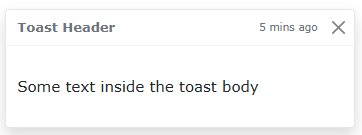
<div class="toast show">
  <div class="toast-header">
    Toast Header
    <button type="button" class="btn-close" data-bs-dismiss="toast"></button>
  </div>
  <div class="toast-body">
    Some text inside the toast body
  </div>
</div>
| 구성 요소 | 설명 |
| `.toast` | 토스트 전체 컴포넌트 |
| `.toast-header` | 상단 제목 영역 |
| `.toast-body` | 본문 메시지 |
| `.btn-close` | 닫기 버튼, `data-bs-dismiss="toast"` 필요 |
| `.show` | 토스트가 보이도록 활성화함 |
2. 토스트 보이게 하기
- 토스트는 기본적으로 숨겨져 있음.
- JavaScript로 수동으로 `.show()` 호출해야 함:
<button id="toastbtn" class="btn btn-primary">Show Toast</button>

<div class="toast" id="myToast">
  <div class="toast-header">
    Notification
    <button type="button" class="btn-close" data-bs-dismiss="toast"></button>
  </div>
  <div class="toast-body">
    작업이 완료되었습니다!
  </div>
</div>

<script>
document.getElementById("toastbtn").onclick = function() {
  const toastEl = document.getElementById("myToast");
  const toast = new bootstrap.Toast(toastEl);
  toast.show();
};
</script>
3. 토스트 자동 숨김 (옵션 설정)
const toast = new bootstrap.Toast(toastEl, {
  delay: 3000,      // 3초 후 자동 닫힘
  autohide: true    // true가 기본값
});
4. 토스트 위치 지정
- 기본적으로 위치는 상단 좌측. 원하는 위치에 `position: fixed`와 함께 배치
<div class="position-fixed top-0 end-0 p-3" style="z-index: 11">
  <div id="myToast" class="toast"> ... </div>
</div>
728x90
반응형
LIST