728x90
반응형
SMALL
1. 기초
- w3schools.com 에서 Bootstrap 5(B5) 선택 (jQuery 제외)
- 만들 때 다음 스타일의 기능 포함:
<!DOCTYPE html>
<html lang="en">
  <head>
    <meta charset="UTF-8" />
    <meta name="viewport" content="width=device-width, initial-scale=1.0" />
    <title>Document</title>
    <link href="https://cdn.jsdelivr.net/npm/bootstrap@5.3.3/dist/css/bootstrap.min.css" rel="stylesheet">
    <script src="https://cdn.jsdelivr.net/npm/bootstrap@5.3.3/dist/js/bootstrap.bundle.min.js">
  </head>
  <body></body>
</html>
2. Container
2.1 기본 영역잡기
- `.container`
- `.container-fluid`: Break Point에 반응하지 않고 일정
- `.container`는 영역이 생길 때 자동으로 좌우의 균등분할됨(`margin 0 auto`)


<div class="container-fluid">  /* container or container-fluid */
      <h1>My First Bootstrap Page</h1>
      <p>This part is inside a .container class.</p>
      <p>The .container class provides a responsive fixed width container.</p>
</div>
2.2 Margin / Padding
- `m` (margin), `p` (padding)
- `t` (top), `b` (bottom), `s` (start), `e` (end), `x`, `y`
- 예: `mt-3`, `p-2`, `mx-5`
<div class="container p-5 my-5 border"></div>

<div class="container p-5 my-5 bg-dark text-white"></div>

<div class="container p-5 my-5 bg-primary text-white"></div>
3. Grid
3.1 Gird
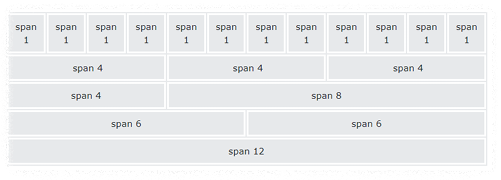
- 하나의 행 `.row`에 12의 컨테이너(`.col-*`) 구성
- 컬럼 그룹핑 가능
3.2 Gird 클래스
| 카테고리 | 크기 (min-width) | 예제 |
| `.col-sm-*` | ≥ 576px | 스마트폰 |
| `.col-md-*` | ≥ 768px | 태블릿 |
| `.col-lg-*` | ≥ 992px | PC |
| `.col-xl-*` | ≥ 1200px | Large PC |
| `.col-xxl-*` | ≥ 1400px | 고통 크기 |
<!-- 균등 분할 -->
<div class="row">
  <div class="col">.col</div>
  <div class="col">.col</div>
  <div class="col">.col</div>
</div>
<!-- 반응형 컬럼-->
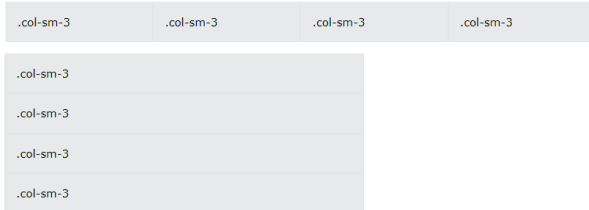
<div class="row">
  <div class="col-sm-3">.col-sm-3</div>
  <div class="col-sm-3">.col-sm-3</div>
  <div class="col-sm-3">.col-sm-3</div>
  <div class="col-sm-3">.col-sm-3</div>
</div>- 브라우저의 폭에 따라 컬럼 그룹핑 변경
- sm까지는 컬럼 3개 그룹핑
- sm미만이면 1줄에 1개 컬럼
<!-- 비균등 분할-->
<div class="row">
  <div class="col-sm-4">.col-sm-4</div>
  <div class="col-sm-8">.col-sm-8</div>
</div>
4. Text/Typography
4.1 텍스트 출력 클래스
| class | 설명 |
| `.lead` | 단락을 돋보이게 |
| `.text-start` | 왼쪽 정렬 텍스트 |
| `.text-break` | 긴 텍스트가 레이아웃을 깨지는 것을 방지 |
| `.text-center` | 중앙 정렬 텍스트 |
| `.text-decoration-none` | 링크에서 밑줄을 제거 |
| `.text-end` | 오른쪽 정렬된 텍스트 |
| `.text-nowarp` | 랩 텍스트 없음 |
| `.text-lowercase` | 소문자 텍스트 |
| `.text-uppercase` | 대문자 텍스트 |
| `.text-capitalize` | 대문자 텍스트 |
| `.initialism` | <abbr> 요소 내부의 텍스트를 약간 작은 글꼴 크기로 표시 |
| `.list-unstyled` | 목록 항목에서 기본 목록 스타일과 왼쪽 여백을 제거합니다 (`<ul>`과 `<ol>` 모두에서 작동). 이 클래스는 즉시 자식 목록 항목에만 적용 |
| `.list-inline` | 모든 목록 항목을 한 줄에 배치 (각 `<li>` 요소에 .list-inline-item과 함께 사용) |
5. Color
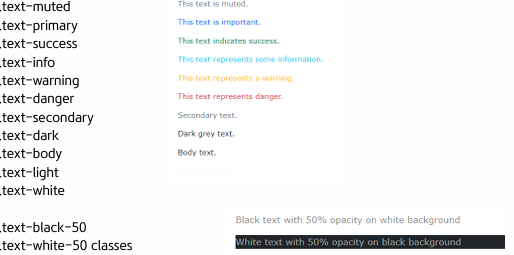
5.1 텍스트 색상 클래스
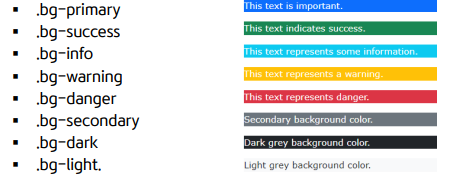
5.2 배경 색상 클래스
728x90
반응형
LIST